iOS 14 made pasteboard access visible to users, so “just read the clipboard” stopped being a harmless background habit.
That is the whole reason this API matters. Starting in iOS 14, the system shows a banner whenever an app accesses clipboard contents. If your app only wants to know whether the pasteboard might contain something useful, reading the full value immediately can feel noisy and intrusive.
The article focuses on the lighter-weight alternative: inspect the likely type first, then only read the actual content if it matches the app's needs.
Sometimes the app is only interested in one kind of clipboard payload, not the entire pasteboard string itself.
That is the practical scenario this article points to. If your app only cares about pasted URLs, for example, it does not need to inspect every copied value the user has. It only needs to know whether the pasteboard is probably holding a URL.
With detectPatterns, the app can filter for likely matches first and defer the actual read until there is a real reason to do it.
The article demonstrates three built-in pasteboard patterns.
The example checks for:
.number,
.probableWebURL,
and .probableWebSearch.
Those are not full semantic guarantees. They are a lightweight classification pass that helps the app decide whether the clipboard is worth reading in detail.
The whole flow fits into one async callback from UIPasteboard.general.detectPatterns.
The example asks the general pasteboard to inspect three possible patterns, then branches based on the returned set.
UIPasteboard.general.detectPatterns(for: [.number, .probableWebSearch, .probableWebURL]) { result in
    switch result {
        case .success(let patterns):
            if patterns.contains(.number) {
                // Probably a number
            } else if patterns.contains(.probableWebSearch) {
                // Probably a web search query
            } else if patterns.contains(.probableWebURL) {
                // Probably a URL
            }
        case .failure(let error):
            print(error.localizedDescription)
    }
}
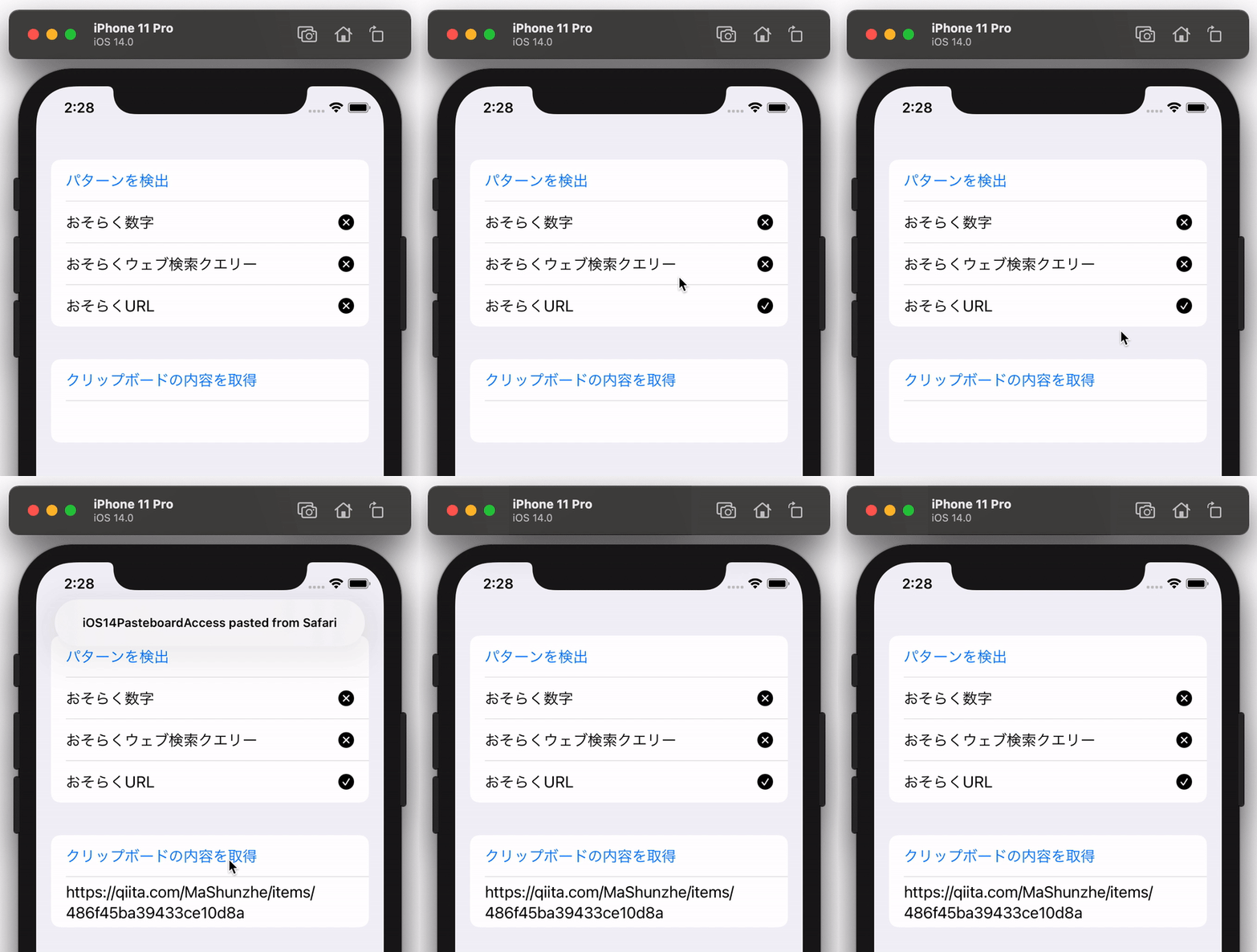
One of the key points called out in the article is that this detection step does not trigger the visible pasteboard-access alert by itself. Only if you later decide to read the real clipboard content do you cross into the normal access path.
The classification is useful, but it is still heuristic.
This article mentions one notable behavior: when the system cannot confidently identify the content,
it seems to fall back to reporting .probableWebSearch.
That means you should treat the result as a hint rather than a strict data contract. It is good enough to drive a “should I inspect this further?” decision, but not good enough to replace later validation of the actual clipboard value.
The demo keeps the idea deliberately simple: one button checks the type, another button reads the actual content.
The GitHub sample linked from this article separates those two actions so the privacy behavior is easy to understand. One action only classifies the clipboard, and the other explicitly fetches the content.
That separation is useful in real apps too. You can keep your UI honest by making it clear when you are merely checking for a likely match versus when you are truly consuming the pasteboard value.
The original sample repository is here: iOS14PasteboardTypeCheck.
The practical habit is simple: only read the clipboard when you already know there is a good reason.
detectPatterns gives you a cleaner way to build that habit into the app. On iOS 14 and later, that is not just a technical convenience.
It is part of making pasteboard usage feel intentional instead of suspicious.