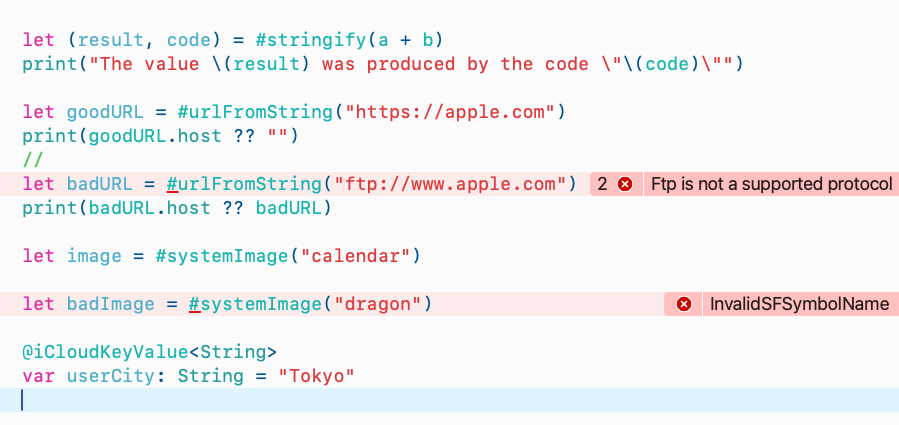
Swift macros are most interesting when they move mistakes from runtime to compile time.
This article focuses on two macro families introduced around WWDC 2023:
ExpressionMacro, which rewrites expressions, and AccessorMacro,
which can synthesize get and set accessors for a property.
That combination is enough to build macros that validate developer input before the app even launches. In these examples, invalid URLs and wrong SF Symbol names stop the build, while an iCloud-backed property gets expanded into explicit accessor code automatically.
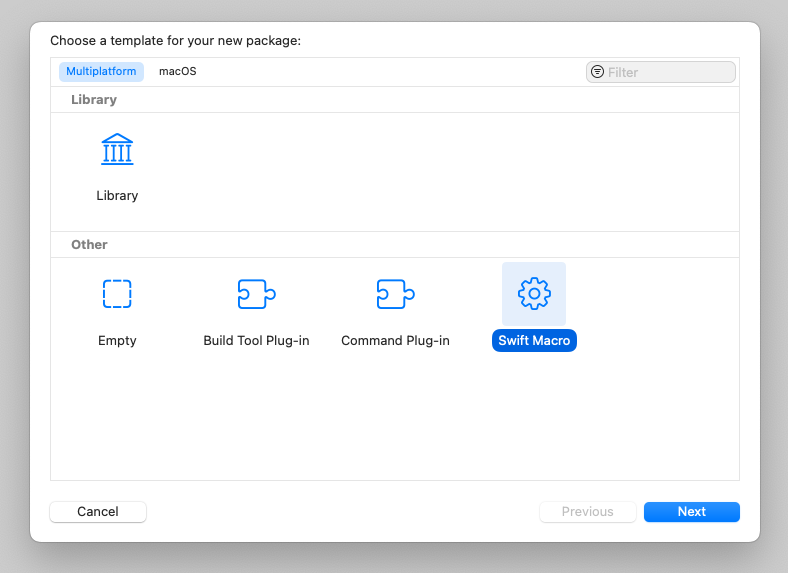
Start by creating a macro package, either from the terminal or from Xcode's package template.
The command-line path is minimal: create a directory, enter it, and initialize a package with
swift package init --type macro. Xcode can generate the same structure through
File > New > Package and the Swift Macro template.
mkdir ExampleSwiftMacro
cd ExampleSwiftMacro
swift package init --type macro
The article calls out two important files in the generated package: the public macro declaration file and the implementation file inside the macros target.
The simplest useful macro is one that receives an expression and returns both its value and its original source text.
The first example is a classic StringifyMacro. It reads the first argument from
node.argumentList, then expands into a tuple containing the evaluated result and the original expression text.
public struct StringifyMacro: ExpressionMacro {
    public static func expansion(
        of node: some FreestandingMacroExpansionSyntax,
        in context: some MacroExpansionContext
    ) -> ExprSyntax {
        guard let argument = node.argumentList.first?.expression else {
            fatalError("compiler bug: the macro does not have any arguments")
        }

        return "(\(argument), \(literal: argument.description))"
    }
}
The public declaration is what lets the app code call it through a leading #.
@freestanding(expression)
public macro stringify<T>(_ value: T) -> (T, String)
    = #externalMacro(module: "ExampleSwiftMacroMacros", type: "StringifyMacro")
Used like #stringify(17 + 25), the expanded result behaves like
(42, "17 + 25"). The same idea works with variables too, so
#stringify(a + b) can preserve the original source instead of only the final value.
Every implementation still has to be registered with the compiler plugin.
After a macro type exists, add it to the plugin's providingMacros list. That is the moment when the package starts exporting it as part of the macro target.
@main
struct ExampleSwiftMacroPlugin: CompilerPlugin {
    let providingMacros: [Macro.Type] = [
        StringifyMacro.self,
        URLMacro.self,
        SwiftUISystemImageMacro.self
    ]
}
The pattern repeats for every additional macro in the package: create the implementation, expose a public declaration with
#externalMacro, and register the implementation type in the plugin.
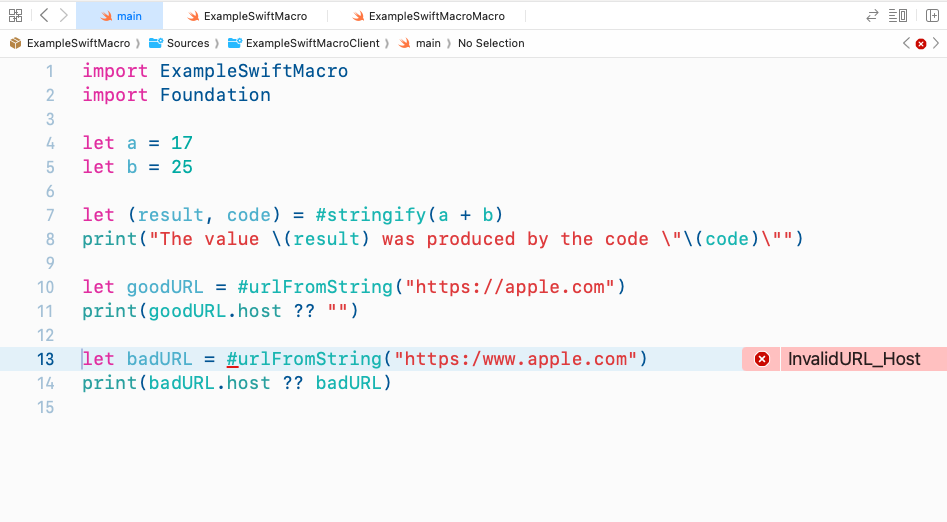
A macro can turn a risky runtime URL initializer into a compile-time check.
Normally, this kind of code only fails when it runs:
if let url = URL(string: "https://example.com") {
    ...
}
The article replaces that with a macro that only accepts a single plain string literal, then checks three things:
the value can initialize a URL, the scheme is supported, and the host exists.
public struct URLMacro: ExpressionMacro {
    public static func expansion(
        of node: some FreestandingMacroExpansionSyntax,
        in context: some MacroExpansionContext
    ) throws -> ExprSyntax {
        guard let argument = node.argumentList.first?.expression else {
            throw URLMacroError.missingArgument
        }

        guard let stringLiteralExpr = argument.as(StringLiteralExprSyntax.self),
              let segment = stringLiteralExpr.segments.first?.as(StringSegmentSyntax.self),
              stringLiteralExpr.segments.count == 1 else {
            throw URLMacroError.argumentNotString
        }

        let text = segment.content.text

        guard let url = URL(string: text) else {
            throw URLMacroError.invalidURL
        }

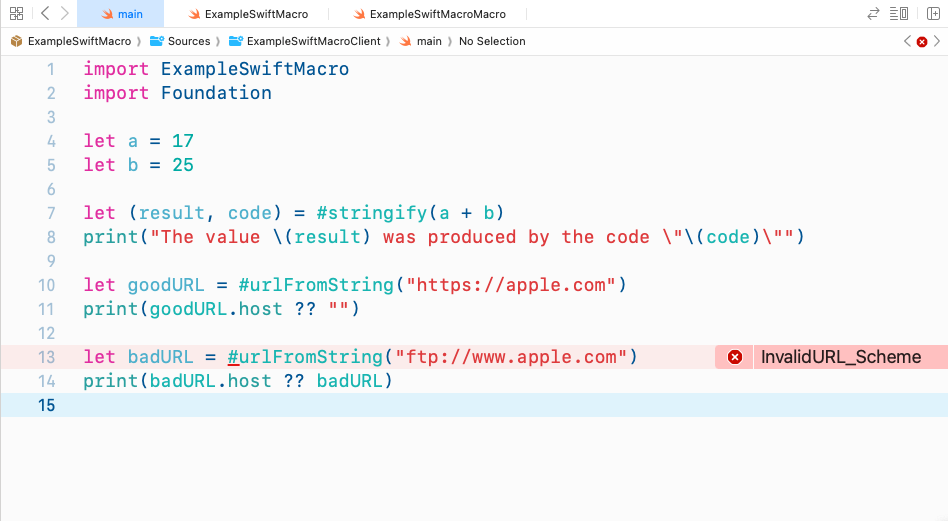
        guard let scheme = url.scheme, ["http", "https"].contains(scheme) else {
            throw URLMacroError.invalidURL_Scheme
        }

        guard let host = url.host, !host.isEmpty else {
            throw URLMacroError.invalidURL_Host
        }

        return #"URL(string: "\#(raw: text)")!"#
    }
}
The public entry point can then be called as #urlFromString("https://apple.com").
If the developer types ftp:// or another invalid value, the build fails immediately instead of shipping a latent runtime bug.
The same compile-time pattern also works for SF Symbols used by SwiftUI.
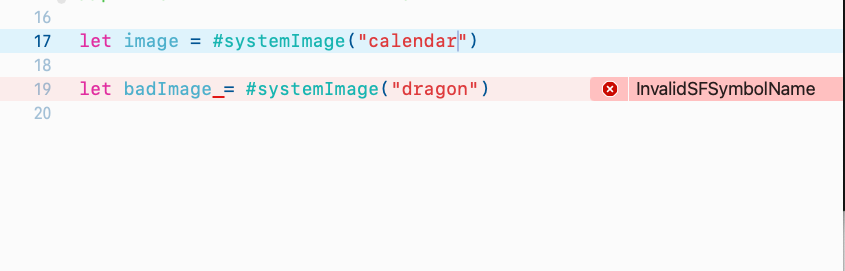
SwiftUI's Image(systemName:) is easy to mistype. The article wraps it in a macro that checks the symbol name by trying to construct
a UIImage on iOS or an NSImage on macOS during macro expansion.
public struct SwiftUISystemImageMacro: ExpressionMacro {
    public static func expansion(
        of node: some FreestandingMacroExpansionSyntax,
        in context: some MacroExpansionContext
    ) throws -> ExprSyntax {
        ...
        #if os(iOS)
        guard UIImage(systemName: text) != nil else {
            throw SFSymbolMacroError.invalidSFSymbolName
        }
        #elseif os(macOS)
        guard NSImage(systemSymbolName: text, accessibilityDescription: nil) != nil else {
            throw SFSymbolMacroError.invalidSFSymbolName
        }
        #endif

        return #"Image(systemName: "\#(raw: text)")"#
    }
}
@freestanding(expression)
public macro systemImage(_ str: String) -> Image
= #externalMacro(module: "ExampleSwiftMacroMacros", type: "SwiftUISystemImageMacro")That turns a typo in a symbol name from an empty or wrong runtime rendering into a compiler error that the developer has to fix immediately.
Accessor macros are a better fit when the goal is not validation, but code generation for a property.
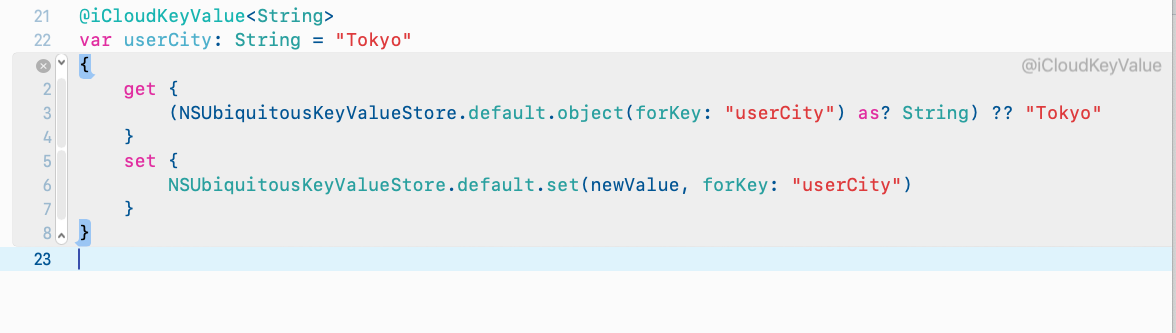
The iCloud key-value example uses an AccessorMacro to synthesize get and set
for a property backed by NSUbiquitousKeyValueStore. The macro reads three pieces of information:
the generic type written in the attribute, the property name, and the default value from the initializer.
public struct NSUbiquitousKeyValueStoreMacro: AccessorMacro {
    public static func expansion(
        of node: AttributeSyntax,
        providingAccessorsOf declaration: some DeclSyntaxProtocol,
        in context: some MacroExpansionContext
    ) throws -> [AccessorDeclSyntax] {
        ...
        let getAccessor: AccessorDeclSyntax =
        """
        get {
            (NSUbiquitousKeyValueStore.default.object(forKey: "\(raw: identifier)") as? \(raw: dataType))\(raw: defaultValue)
        }
        """

        let setAccessor: AccessorDeclSyntax =
        """
        set {
            NSUbiquitousKeyValueStore.default.set(newValue, forKey: "\(raw: identifier)")
        }
        """

        return [getAccessor, setAccessor]
    }
}
The helper that reads the generic type from the attribute matters because the macro wants to let the declaration stay compact, such as
@iCloudKeyValue<String> var userCity: String = "Tokyo".
Throwing an error is only half the story. Good macros also explain the failure in language developers can act on.
The article closes by improving the URL macro with custom compiler diagnostics. Instead of only throwing internal error cases,
it defines an enum that conforms to DiagnosticMessage and provides a custom message, severity, and diagnostic ID.
public enum CodingKeysMacroDiagnostic {
    case missingArgument
    case argumentNotString
    case invalidURL
    case invalidURL_Scheme(String)
    case invalidURL_Host
}

extension CodingKeysMacroDiagnostic: DiagnosticMessage {
    func diagnose(at node: some SyntaxProtocol) -> Diagnostic {
        Diagnostic(node: Syntax(node), message: self)
    }

    public var message: String {
        switch self {
        case .missingArgument:
            return "You need to provide the argument in the parameter"
        case .argumentNotString:
            return "The argument you provided is not a String"
        case .invalidURL:
            return "Cannot initialize a URL from your provided string"
        case .invalidURL_Scheme(let scheme):
            return "\(scheme) is not a supported protocol"
        case .invalidURL_Host:
            return "The hostname of this URL is invalid"
        }
    }
}
The important usage pattern is calling context.diagnose(...) inside each failing branch before throwing the internal error.
That is what turns the macro from a strict validator into a tool that teaches the developer what to fix.

The real value of Swift macros is not novelty. It is putting validation and boilerplate generation where the compiler can help.
This article is a good introduction because it covers both halves of the feature: expression rewriting and accessor synthesis. The same building blocks can be extended into design-system helpers, strongly typed configuration, validation rules, or storage wrappers.
This article also links the sample source repository here: Swift_Macro_Qiita on GitHub.