This article is a grab bag of small helpers that the author found worth reusing across projects.
That is the right way to read it. This is not an argument that every utility should live in an extension. It is a practical shortlist of the sort of operations developers end up rewriting over and over: format a date, show a quick alert, jump a table view to the top or bottom, round a view into a button shape, grab a screenshot, define a few named colors, or reach the scene and app delegates from a controller.
This article also says it would keep growing over time, so the collection is intentionally open-ended rather than tightly themed.
In Swift, an extension adds convenience behavior to an existing type without forcing that code back into the original class definition.
That makes extensions a natural place for repeated utility code, especially when the helper belongs to a type you already use everywhere:
Date, String, UITableView, UIView, or UIColor.
extension SomeType {
    // convenience helpers here
}
The article's real message is not about syntax. It is about deciding which recurring pieces of UI or formatting logic deserve a stable home.
The first helpers are small but common: make a date readable and turn a string into a quick alert message.
The Date example formats the current date as a plain yyyy-MM-dd string and exposes a helper for reading a calendar component such as the month.
That is the sort of code developers often rewrite inline even though it is a good candidate for one shared utility.
extension Date {
    func getString() -> String {
        let formatter = DateFormatter()
        formatter.dateFormat = "yyyy-MM-dd"
        return formatter.string(from: self)
    }

    func getComponent(_ component: Calendar.Component) -> Int {
        Calendar.current.component(component, from: self)
    }
}
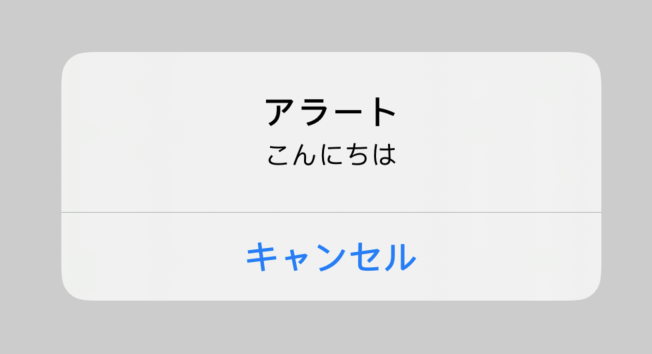
The String example goes in a very UIKit direction: use the string itself as the alert message and present a basic
UIAlertController on a target view controller.
The table view helpers are focused on one job: jump to the first or last row without repeating the same index-path code.
This article adds scrollToTop() and scrollToBottom(), both wrapped in
DispatchQueue.main.async so the scroll operation runs on the UI thread.
extension UITableView {
    func scrollToTop() {
        DispatchQueue.main.async {
            let indexPath = IndexPath(row: 0, section: 0)
            self.scrollToRow(at: indexPath, at: .top, animated: false)
        }
    }

    func scrollToBottom() {
        DispatchQueue.main.async {
            let lastSection = self.numberOfSections - 1
            let lastRow = self.numberOfRows(inSection: lastSection) - 1
            let indexPath = IndexPath(row: lastRow, section: lastSection)
            self.scrollToRow(at: indexPath, at: .bottom, animated: true)
        }
    }
}
These are not complex abstractions, and that is the point. If a project needs them often, an extension keeps the call sites short and obvious.
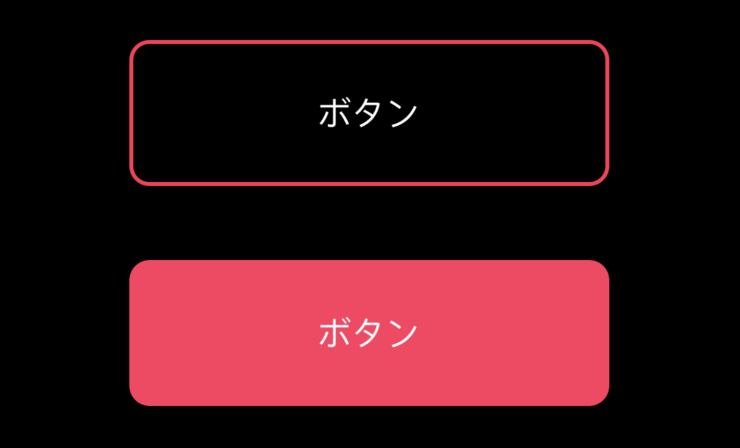
The most visible examples in the article are the UIView helpers for rounded buttons, outlined buttons, and screenshots.
One helper sets corner radius, border color, and border width so a plain view can look like an outlined rounded button. Another fills the background to create a solid rounded button instead. A separate method captures the view as an image by drawing the hierarchy into a graphics context.
public extension UIView {
    func setUpOutlinedRoundButton(color: UIColor = .systemPink) {
        layer.cornerRadius = 10
        layer.borderColor = color.cgColor
        layer.borderWidth = 2
        clipsToBounds = true
    }

    func setUpRoundButton(color: UIColor = .systemPink) {
        layer.cornerRadius = 10
        backgroundColor = color
        clipsToBounds = true
    }

    func takeScreenshot() -> UIImage? {
        UIGraphicsBeginImageContextWithOptions(bounds.size, false, UIScreen.main.scale)
        drawHierarchy(in: bounds, afterScreenUpdates: true)
        let image = UIGraphicsGetImageFromCurrentImageContext()
        UIGraphicsEndImageContext()
        return image
    }
}
The rest of the collection is smaller: named custom colors and a couple of convenience hooks into app-level delegates.
The UIColor section defines reusable named colors such as oceanBlue, lightSkyBlue,
skyBlue, forestGreeen, and yellowGreen. This is a lightweight alternative to scattering raw RGB literals throughout the app.
The UIViewController extension then adds iOS 13 helpers for reading the current UISceneDelegate
and the app's UIApplicationDelegate. That is a convenience pattern some teams like when scene-based APIs started overlapping with older app-level entry points.
public extension UIViewController {
    @available(iOS 13.0, *)
    func getUISceneDelegate() -> UISceneDelegate? {
        view.window?.windowScene?.delegate
    }

    @available(iOS 13.0, *)
    func getUIApplicationDelegate() -> UIApplicationDelegate? {
        UIApplication.shared.delegate
    }
}This article also points to a reusable package and exposes many of the helpers in both English and Japanese method names.
That bilingual API shape is unusual, but it is one of the distinctive details in this article. For example,
the article pairs helpers like showSimpleAlert(on:) with a Japanese alias, and does the same for several of the date,
table, and view utilities.
It also links to a GitHub package where the helpers can be imported directly:
import SwiftExtensionsIf you adopt the pattern in your own codebase, the more durable lesson is not the exact method names. It is to centralize repetitive behavior once you have seen it recur enough times to justify one shared implementation.
This article works best as a reminder that small extensions are often most valuable when they remove boring code, not when they try to be clever.
Date formatting, a throwaway alert, table scrolling, rounded views, screenshots, named colors, and delegate lookups are all minor tasks in isolation. Together, they are exactly the kind of friction that utility extensions can smooth out across a UIKit-heavy project.