iOS 14 made SwiftUI feel less like a view layer sitting on top of the real app and more like the real app entry point.
This article focuses on three related areas. First, @AppStorage gives SwiftUI a direct way to bind simple values to
UserDefaults. Second, @SceneStorage handles state that belongs to one scene or window instead of the whole app.
Third, the new App protocol changes how lifecycle events, deep links, and delegate callbacks are expressed.
None of this was flashy in the same way as a new visual control. But for real app work it mattered. These APIs reduced glue code, made common persistence patterns more declarative, and clarified how SwiftUI apps should react to scene state and incoming URLs.
@AppStorage is the simple bridge between a SwiftUI property and UserDefaults.
The intent is straightforward: if a setting is small, app-wide, and naturally lives in defaults, SwiftUI can now expose it as a property instead of forcing you to read and write keys manually. The wrapped value becomes both the binding source for the UI and the fallback default when no stored value exists yet.
struct ContentView: View {
    @AppStorage("currentCity") private var currentCity = "Tokyo"

    var body: some View {
        VStack(alignment: .leading, spacing: 16) {
            Text(currentCity)
            TextField("City", text: $currentCity)
                .textFieldStyle(.roundedBorder)
        }
        .padding()
    }
}
That is the real win. The code reads like ordinary SwiftUI state, but the value persists automatically. For small preferences,
last-used values, or lightweight onboarding choices, that is much cleaner than scattering UserDefaults.standard
calls through event handlers.
@SceneStorage is for state that should survive within one window, not across the whole app.
This distinction matters more once an app can have multiple scenes. @SceneStorage is not a general persistence layer.
It is a scene-specific restoration mechanism. If the user is drafting text in one window, that draft belongs to that window's state,
not to every instance of the app on the device.
struct DraftView: View {
    @SceneStorage("postContent") private var postContent = "This is a draft..."

    var body: some View {
        TextEditor(text: $postContent)
            .padding()
    }
}
The important mental model is scope. Use @AppStorage when the value is shared at the app level. Use
@SceneStorage when the value belongs to a specific scene and should come back when that scene is restored.
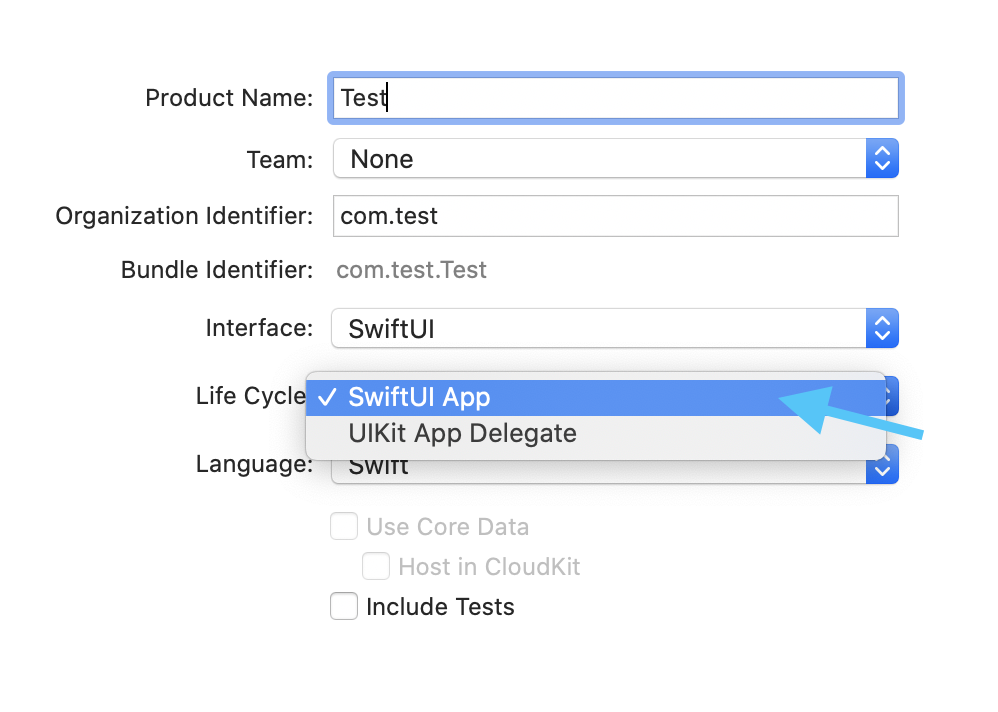
The new SwiftUI app model replaces the old file structure, but it still gives you real hooks for app and scene events.
With the App protocol, a SwiftUI app no longer needs the old default combination of AppDelegate and
SceneDelegate files. That did not mean lifecycle handling disappeared. It moved into SwiftUI-native entry points.
For foreground, inactive, and background transitions, the most direct tool is the environment's scenePhase value.
It lets a view react declaratively when the scene moves between states.
struct ContentView: View {
    @Environment(\.scenePhase) private var scenePhase

    var body: some View {
        Text("Hello, world!")
            .onChange(of: scenePhase) { phase in
                switch phase {
                case .active:
                    print("active")
                case .inactive:
                    print("inactive")
                case .background:
                    print("background")
                @unknown default:
                    print("unknown")
                }
            }
    }
}
Deep links also fit directly into this new model. Custom URL schemes and universal links can be handled through
.onOpenURL attached to the root content inside the app scene.
@main
struct ExploreSwiftUIApp: App {
    var body: some Scene {
        WindowGroup {
            ContentView()
                .onOpenURL { url in
                    print("Incoming URL: \(url)")
                }
        }
    }
}If you still need classic delegate behavior, @UIApplicationDelegateAdaptor lets the new app model host the old callback style.
This was one of the most practical parts of the transition. SwiftUI apps did not force a total rewrite of every launch-time integration. If a project still depended on traditional app delegate functions, the new entry point could adapt them instead of abandoning the SwiftUI lifecycle entirely.
@main
struct ExploreSwiftUIApp: App {
    @UIApplicationDelegateAdaptor private var appDelegate: AppDelegate

    var body: some Scene {
        WindowGroup {
            ContentView()
        }
    }
}

final class AppDelegate: NSObject, UIApplicationDelegate {
    func application(
        _ application: UIApplication,
        didFinishLaunchingWithOptions launchOptions: [UIApplication.LaunchOptionsKey: Any]? = nil
    ) -> Bool {
        print("Did finish launch")
        return true
    }
}
This article also points out a smaller pattern that still matters: not every event needs a full delegate bridge.
Many notifications can be observed directly in SwiftUI with .onReceive and a publisher from
NotificationCenter.
Text("Enter some text here")
    .onReceive(
        NotificationCenter.default.publisher(
            for: UIApplication.keyboardDidShowNotification
        )
    ) { _ in
        print("Keyboard is shown")
}The useful pattern here is scope and entry points.
@AppStorage is for app-level small persistence. @SceneStorage is for per-scene restoration.
scenePhase and .onOpenURL cover common lifecycle and routing events inside the SwiftUI world.
@UIApplicationDelegateAdaptor remains the escape hatch when older imperative callbacks are still needed.
That is why this iOS 14 article still holds up. It captures the moment when SwiftUI stopped being only a UI syntax and started becoming a more complete application structure.